











Buying a CO2 laser cutting machine is not as simple as checking the highest power or the biggest working area. I have seen many buyers compare machines only by numbers at first. After the machine arrives, they find the real problem is not the number on the brochure. It is whether the machine can cut their own material well, whether the table size fits their sheets, and whether the edge quality can pass customer inspection.
If your work is mainly acrylic signs, wood boards, plastic sheets, leather, fabric, paper, packaging samples, or decorative panels, a CO2 laser cutting machine is usually worth looking at. It is a common choice for non-metal cutting because it handles these materials cleanly and with good detail. But the right model still depends on your thickness, order volume, drawing type, and working time each day.
This article keeps things practical. Before you ask for a quote, you need to know what to check, what to avoid, and when the VIC Laser Cutting Machine from Victory Industry may fit your production.
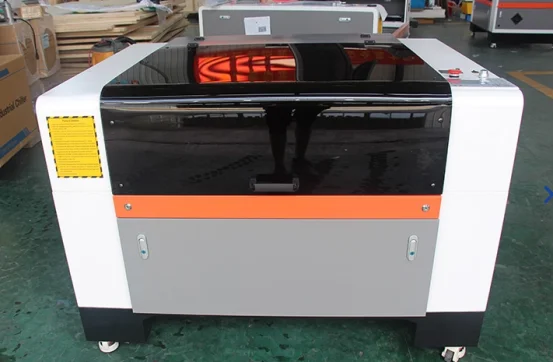
What Buyers Should Check Before Comparing Models
A lot of buyers start by asking, “How much is one CO2 laser cutting machine?” That question is normal, but it is too early. Before price, you need to know your actual cutting job. Material, thickness, sheet size, edge requirement, and daily output decide the machine first. Price comes after that.
Material Type and Thickness Come First
CO2 laser machines are mainly used for non-metal materials. Acrylic, wood, MDF, paper, plastic, leather, fabric, rubber, and similar materials are all common. For acrylic signs, the smooth edge is one reason many workshops choose CO2 laser cutting. For wood crafts, packaging samples, and fabric cutting, the value is more about flexible shapes and fast file changes.
Thickness matters a lot. Thin acrylic and thick MDF cannot use the same thinking. A small gift shop cutting thin sheets may not need high power. A signage factory cutting thicker acrylic letters or larger display panels needs more power and a larger bed.
One thing should be made clear: PVC is not a good material for CO2 laser cutting. It can release harmful fumes and may also damage parts inside the machine. If you are not sure what type of plastic you have, confirm it before cutting.
CO2 Laser Cutter vs Fiber Laser Cutter
Some buyers mix up CO2 laser cutter and fiber laser cutter. They are both laser cutting equipment, but they are not aimed at the same work.
A CO2 laser cutter is better for non-metal materials such as acrylic, wood, fabric, leather, paper, and many plastics. It is often used in advertising, signage, crafts, packaging, garment samples, and display products.
A fiber laser cutter is better for regular metal cutting. If your daily jobs are stainless steel, carbon steel, aluminum, brass, or copper, fiber laser cutting equipment is usually the better choice.
So the first question is not which machine looks stronger. The first question is what you cut every day. If most of your orders are non-metal materials, a CO2 laser cutting machine makes sense. If your business is mainly sheet metal fabrication, you should go to fiber laser instead.
Power, Working Area, and Table Choice Affect Daily Output
Laser power affects cutting depth and speed. For thin acrylic, leather, paper, fabric, and small craft items, 80W to 100W can already handle many jobs. For acrylic signs, MDF, wood boards, and more regular workshop use, 100W to 150W is often more suitable. If you cut thicker sheets or run the machine for longer hours, 180W to 300W gives more room. For large-format or heavier non-metal production, 300W to 600W may be needed, but cooling and exhaust must also keep up.
Working area is just as important. A small bed is fine for samples, gifts, labels, and small parts. For large signage panels or batch layouts, a bigger working area saves time because you do not need to move the sheet again and again.
The table type also matters. Knife tables are often used for harder sheet materials. Honeycomb tables are useful for fabric, paper, leather, and small pieces that need more support. Do not choose the table only by habit. Choose it by your material.
How to Match Laser Cutting Equipment to Your Daily Work
The easiest way to choose laser cutting equipment is to start from your own orders. What materials do you cut most? What is the normal sheet size? What thickness appears again and again? Do you need cutting only, or engraving too? How many hours will the machine work each day?
For a signage workshop, smooth acrylic edges and stable positioning are important. For a fabric user, smoke control, table support, and less burning may matter more. For a wood craft producer, engraving quality and file compatibility can be just as important as cutting speed.
This is why I do not suggest choosing a machine only by one impressive parameter. A machine with high power but the wrong working area can still slow you down. A large machine with poor exhaust can still make daily work uncomfortable. A machine that looks cheap at first may cost more later if setup is hard and maintenance is unclear.
Why the Wrong Machine Choice Creates Real Problems
A wrong CO2 laser cutting machine may not look wrong on paper. The problems usually show up after delivery. The cut edge is rougher than expected. The machine needs too much testing before each job. Operators spend time adjusting instead of producing. Some orders need repositioning many times because the bed is too small.
These are not small issues. They affect delivery time, material waste, and customer satisfaction.
Poor Edge Quality Usually Comes from a Bad Match
If you need clean acrylic edges or fine decorative details, the machine has to run steadily. The laser tube, laser head, guide rail, motor, belt drive, worktable, cooling, and exhaust all play a role. If one part is weak, the final cut may show burning, uneven lines, poor detail, or unstable repeatability.
Useful setup features also save time. Red dot positioning helps operators align materials faster. A simple control system makes file handling easier. These things may sound small, but in a workshop with many short orders, they make daily work smoother.
An Oversized or Undersized Configuration Can Waste Money
Buying too small creates trouble. You may need to reposition large sheets many times. That slows production and increases errors.
Buying too large also creates waste. If your main work is thin fabric, paper, or small acrylic pieces, a very large high-power machine may not bring a better return. You pay more, but your order type does not need it.
The better way is simple. List your main materials, common thickness, sheet size, and expected output. Then choose the power, bed size, and options around that list.
Why the VIC Laser Cutting Machine Fits Many Buyers
For workshops cutting acrylic, wood, plastics, leather, fabric, signage parts, decorative panels, and custom non-metal components, the VIC Laser Cutting Machine can be a practical option. It gives buyers several choices in power and working area, so you do not have to force all jobs into one fixed setup.
Victory Industry is not only dealing with CO2 laser cutting machines. The company also works with laser welding, laser cleaning, laser marking, CNC forming equipment, and automation systems. For buyers, this wider equipment background is useful because machine selection is not only about the machine body. It is also about process, setup, training, maintenance, and future production needs. Buyers who want to see the wider equipment range can also check the full products page.
Key Configuration Details That Matter in Real Use
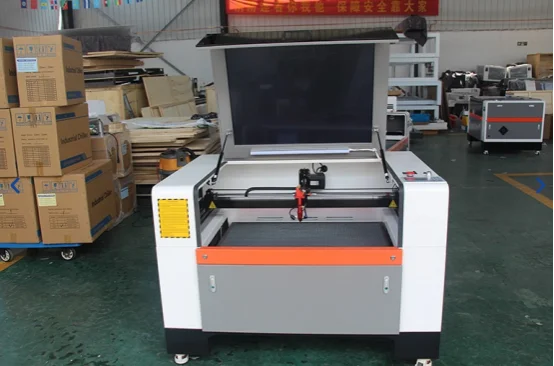
The VIC Laser Cutting Machine uses an advanced CO2 laser cutting head, a high-performance CO2 laser tube, precision linear guides, high-precision stepper motors, and an efficient belt drive system. These parts affect how smoothly the machine moves and how stable the cutting result stays during repeated jobs.
The aluminum blade worktable supports sheets during cutting and helps reduce vibration. The optional red dot pointer makes positioning easier when operators load materials. The control system is made for easier setup and adjustment, which is helpful for workshops that handle different drawings every day.
Technical Range That Makes Selection Easier
The product line covers laser power from 80W to 600W. Working area options range from 600 × 400 mm to 1500 × 3000 mm. This range gives buyers more room to choose according to real order size.
The machine also offers 0.01 mm positioning accuracy, 0.02 mm repetition accuracy, cutting speed of 150 mm/s, knife or honeycomb worktable options, and support for common graphic formats such as PLT, DXF, BMP, JPG, and AI. For many users, this is enough for daily cutting, engraving, signage work, samples, and small to medium production.
If the buyer wants to compare a more specific model for acrylic, wood, plastic cutting, and engraving work, the VIC-C Laser Cutting Machine is also worth checking because it fits the same non-metal processing direction.
Where This Machine Creates the Most Value
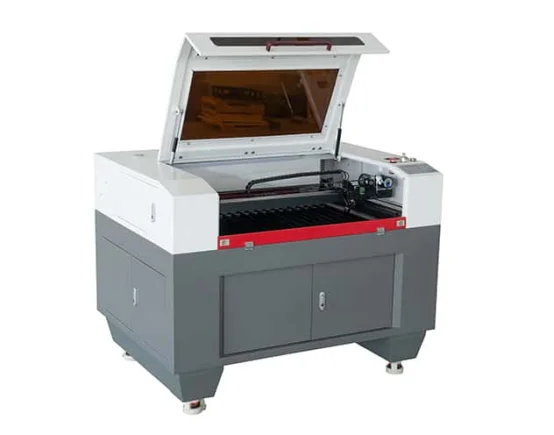
A machine only shows its value when it starts working every day. The VIC Laser Cutting Machine is more useful when your orders need flexible cutting, stable edges, and frequent file changes.
Signage, Acrylic, Wood, and Fabric Work
This model fits signage production, acrylic display products, wood cutting and engraving, textile processing, leather cutting, packaging samples, and decorative parts. These jobs often need clean edges, accurate shapes, and repeatable results.
If you supply acrylic letters, display stands, wooden ornaments, fabric patterns, or branded shop materials, you need a machine that can handle different drawings without too much setup trouble.
Custom Orders and Small-Batch Jobs
Many workshops do not only do mass production. They get small orders, urgent orders, and changing design files. For this kind of work, easy switching is important.
A CO2 laser cutting machine can cut one prototype today and a medium batch tomorrow. This flexibility is why many small and medium workshops choose it before moving into larger production.
How to Decide Before You Ask for a Quote
Before asking for a quote, prepare your material list first. Add thickness range, sheet size, cutting or engraving needs, daily output, and any special work such as round materials.
If you send this information clearly, the supplier can recommend laser power, working area, worktable type, chiller, exhaust system, and accessories more accurately. A vague inquiry usually gets a vague answer. A clear inquiry saves time for both sides.
Optional Systems Can Matter More Than You Expect
Optional systems include a rotary attachment, industrial water chiller, exhaust system, and gas supply system. A rotary attachment is useful for round items. A water chiller helps the laser tube stay stable during longer work. An exhaust system removes smoke and dust. A gas supply system can help improve cutting conditions for some materials.
You may not need every option from the first day. But if your order volume may grow, it is better to discuss these choices early.
Why Service and Contact Support Matter After Purchase
A CO2 laser cutting machine needs correct installation, testing, training, and maintenance. This is even more important if your team is using this type of equipment for the first time.
Installation, Training, and Maintenance Support
Good service should cover machine placement, calibration, cooling setup, exhaust setup, lens cleaning, mirror alignment, and daily checks. These basic details reduce many common problems.
Maintenance is not complicated, but it should be done regularly. Lenses, mirrors, laser tubes, cooling systems, exhaust systems, and motion parts all affect cutting quality over time. If you want to check the support scope before buying, the services page is a useful place to start.
When to Contact the Team
If you are comparing models, do not wait until after buying to ask technical questions. Send your material, thickness, sheet size, drawing type, and production goal first. Then ask for a suggested configuration. This makes the quote more useful and lowers the chance of choosing the wrong machine.
For model selection, price discussion, or configuration questions, you can use the contact page and send the basic material details directly.
Conclusion
Choosing a CO2 laser cutter is easier when you stop looking only at power and size. Material type, cutting thickness, working area, edge quality, daily workload, cooling, exhaust, and future order plans all matter.
For buyers working with acrylic, wood, plastics, leather, fabric, signage, packaging, and decorative parts, laser cutting equipment can improve flexibility and cutting quality. The VIC Laser Cutting Machine is worth considering because it offers a wide power and size range while keeping daily operation practical. If your current work is non-metal cutting and you want room for future growth, it can be a sensible model to compare.
FAQ
Q1: How do I know whether laser cutting equipment is suitable for my material?
A1: Check your material type, thickness, and edge requirement first. CO2 laser cutting equipment is commonly used for acrylic, wood, plastic, paper, leather, fabric, rubber, and other non-metal materials.
Q2: What laser power should I choose for a CO2 laser cutting machine?
A2: Thin materials usually need less power. Thicker sheets, faster cutting, and longer daily production need more power. Your material and thickness should decide the range.
Q3: Why does working area matter?
A3: The working area decides what sheet size you can process in one pass. A larger bed saves time for big panels and batch layouts. A smaller bed may be enough for samples and small parts.
Q4: Is a CO2 laser cutter better than a fiber laser cutter?
A4: For non-metal materials, CO2 laser cutter is usually better. For regular metal cutting, fiber laser cutter is usually the better choice.
Q5: Which accessories should I consider first?
A5: A water chiller, exhaust system, rotary attachment, and gas supply system are common options. Choose them based on your material, working time, and order type.
Q6: What should I prepare before asking for a quote?
A6: Prepare your material type, thickness range, sheet size, cutting or engraving needs, daily workload, and any special requirements such as round material cutting or smoke control.